

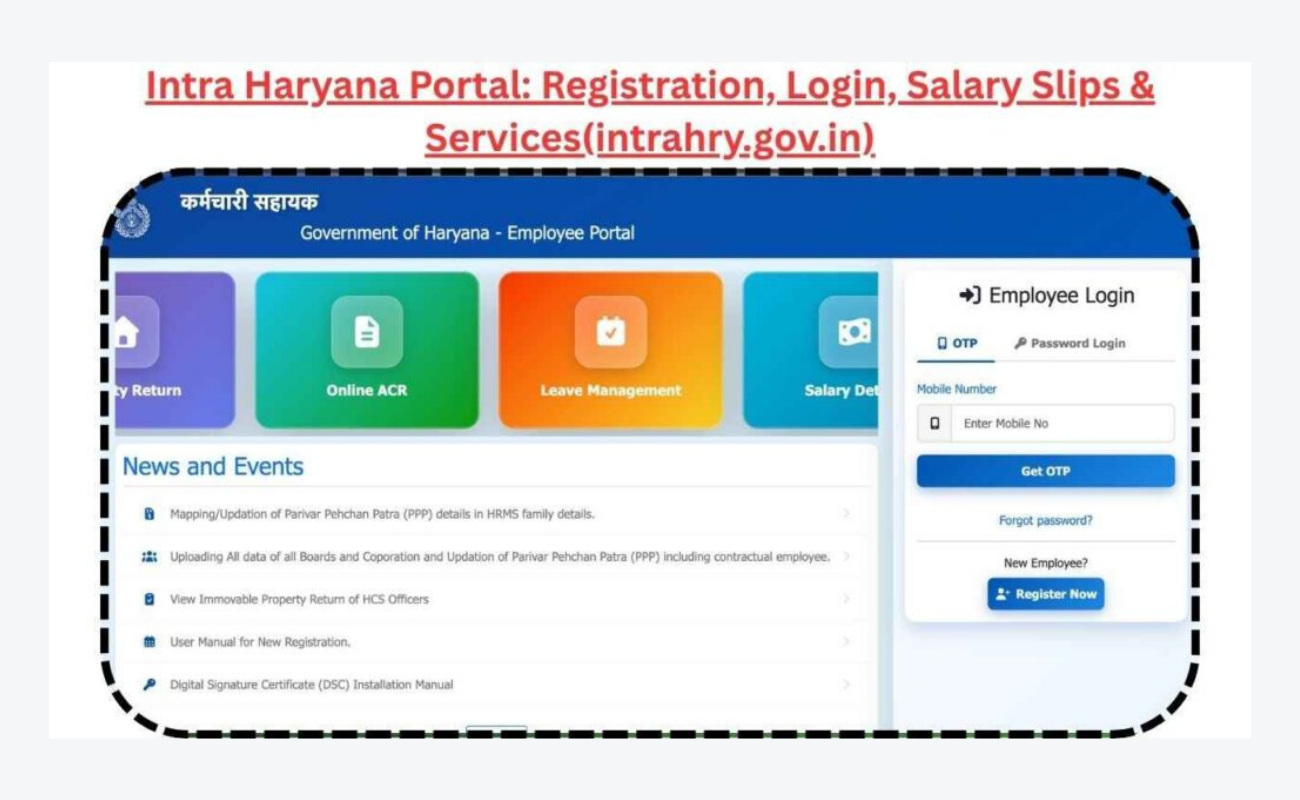
If you are a government employee in Haryana, there is a good chance someone at your office has told you to “check Intra Haryana” for your salary slip, leave application, or transfer details. And if you are new to the system, your first thought was probably — what even is this, and why do I need another login? Let us break it down properly, without the government jargon, so you actually understand what is going on.
What Is Intra Haryana?
Intra Haryana is basically the online portal that the Haryana government built to handle everything related to its employees digitally. The official website is intrahry.gov.in, and it is connected to the HRMS system — that stands for Human Resource Management System, but you do not need to remember that. What matters is that this one portal is where your department uploads your salary details, where you apply for leave, where you check your attendance, and where the entire transfer process happens now.
Before this, everything was paper-based. You wanted a transfer? You wrote an application, ran around with it, waited for months, and hoped someone actually read it. You wanted your salary slip? You asked the accounts guy and prayed he was in a good mood. Intra Haryana was created to fix all of that — one place, one login, and everything in one spot.
What Can You Actually Do on This Portal?
Once you log in, the portal gives you access to a bunch of things. Here is what most employees use it for:
Check Your Salary Slip: This is probably the most used feature. Every month, your salary details get uploaded here. You can log in, download your slip, see your deductions, your allowances, and your net pay. You can also download your annual salary statement, which you will need when applying for loans or filing taxes. No more begging the accounts department for a printout.
Apply for Leave: Whether it is casual leave, earned leave, medical leave, or a tour request, you can apply for it directly through the portal. Your department head gets notified, approves or rejects it online, and the whole thing is tracked. You can also see how much leave balance you have left, which saves you from awkward conversations with your boss.
Track Attendance: The portal keeps a record of your attendance. You can check if your leave was marked properly, if there are any discrepancies, and raise objections if something looks wrong.
Online Transfers: This is the big one. Haryana government now handles employee transfers through this portal under what they call the Model Online Transfer Policy. If you have completed your minimum tenure at your current posting and you want to move somewhere else — maybe closer to home, maybe to join your spouse, or just for a change — you apply through Intra Haryana. The system calculates merit points based on your age, experience, category, and other factors. You fill your preferences, the system allocates posts, and transfer orders are generated online. It is supposed to be transparent, which means less room for the usual “who knows whom” games.
Update Your Profile: You should maintain your personal information, skills and contact details on the portal. This is significant as it will be used in the transfer system to determine your eligibility and merit points. If your information is incorrect or obsolete, you may end up with a posting you don’t want.
Read Also: Become a Myntra Seller in 2026: A Complete Guide for Sellers
How Do You Register or Log In?
Your department/college admin will typically create the initial account on the portal if you have never been on the portal before. They will use your employee ID or service number to create your login. After completing this, you have to go to intrahry.gov.in, enter your username and password and then you are in.
There is a reset on the logon page if you forget your password. You will enter your registered mobile number/ email and receive an OTP and create a new password. Your department’s nodal officer may reset this for you, even if that doesn’t work. Don’t try out a bunch of guesses because you will end up being locked out!
The Transfer Policy — What Employees Should Know
In 2026, the Haryana government updated its transfer policy and made the whole thing online through this portal. Here is what that means for you in simple terms:
Minimum Tenure — You need to complete a minimum number of years at your current unit before you can apply for a voluntary transfer. The exact number depends on your department and cadre, but usually it is around three years.
Merit Points — When you apply for a transfer, the system gives you points based on things like your age, how long you have been in service, whether you are a woman, whether you have a disability, whether your spouse is also a government employee, and so on. Older employees generally get more points because they are closer to retirement.
Preferences — You get to list the units or districts where you want to be posted. The system tries to match you based on your rank and the vacancies available. If you do not fill any preferences, you could literally be posted anywhere in the state.
Categories — Employees are put into different buckets. There is the Deemed category for people who have completed their prescribed tenure and are basically due for a transfer. There is the Voluntary category for people who have done the minimum tenure but not the full prescribed one. Then there is the Protected category for employees who are nearing retirement, have serious health issues, or have disabilities — they get extra consideration.
Rationalization — Sometimes a unit has too many employees and not enough work. In those cases, the excess staff is marked as surplus and has to move. The system handles this too.
The whole process is done in stages — data verification, preference filling, unit allocation, and then order generation. You get OTP-based authentication at every step, so no one can mess with your account without your permission.
Common Problems and How to Deal With Them
Let us be honest — no government portal runs perfectly. Here are the issues people usually face and what you can do:
Portal not loading — During transfer season or result time, the site gets hammered by thousands of employees logging in at once. Try early morning or late night. Use a proper browser like Chrome instead of whatever default app your phone has.
Data looks wrong — Maybe your tenure is showing incorrectly, or your category is wrong. Do not ignore it. There is a window during the transfer drive where you can raise objections. Use it. If you miss that window, the data is considered final and you are stuck with it.

Forgot password and no access to registered phone — This happens more than you would think. Go to your department’s nodal officer. They can reset it from the admin side.
Transfer order issued but you want to appeal — You have 15 days after the order is issued to file a grievance through the portal. But here is the catch — you have to join your new posting first, and then appeal. You cannot just refuse to move and complain from your old office.
Why This Portal Actually Matters
Look, Intra Haryana is not perfect. It hangs sometimes, the interface is not winning any design awards, and the OTP delays can drive you crazy. But compared to the old system where everything was manual, opaque, and basically depended on who you knew, this is a massive improvement. Your salary is trackable, your leave is documented, your transfer is based on rules rather than connections, and you have a digital record of everything.
If you are a Haryana government employee and you are not using this portal yet, you are making your own life harder. Get your login details, bookmark the site, and at least check your salary slip and attendance every month. When transfer season comes around, you will thank yourself for knowing how the system works instead of running around at the last minute.
Final Word
Intra Haryana is the Haryana government’s attempt to bring all employee services online — salary, leave, attendance, and transfers. The portal is at intrahry.gov.in, and every government employee in the state should have access to it. It is not the smoothest website out there, but it gets the job done. Learn how to log in, keep your profile updated, check your data during transfer drives, and raise objections when something looks off. In a system where paperwork used to rule everything, having everything online and trackable is honestly a big deal. Use it wisely.
Read More: Eehhaaa.com: What It Actually Is and Why People Keep Talking About It
